


Note: In an email Wednesday, August 5, Plotdrive’s founders announced that the tool will be shutting down permanently on September 13. Built-in Plotdrive models no longer work, though users can continue writing, editing, and using external API keys until the site closes. Current users should download their files before the September 13 deadline; however, anyone who misses the September 13 deadline can email Plotdrive at support@plotdrive.com to have their files exported and emailed to them before all user data is permanently deleted September 27.
For a lot of writers, getting started isn’t the hardest part. It’s what happens a few thousand words in.
Drafting slows down. A scene stops working. The next step in the story feels unclear. Sometimes the problem is structural—a missed beat or underdeveloped character. Other times it isn’t technical at all; instead, hesitation, uncertainty, or a loss of creative momentum pull the writer out of the work entirely.
Plotdrive is built for that moment, whether that break in momentum comes from narrative friction, technical uncertainty, or a quieter creative stall.
The AI-assisted writing software is designed for longform work like novels and scripts. It combines a document editor with built-in tools for outlining, drafting, and revision, allowing writers to generate ideas or text without leaving their manuscript. But the platform isn’t only designed for mid-draft recovery. It can also be used from the beginning of a project, with guided prompts that help writers build character profiles, outlines, and style guides before drafting starts. Writers can construct an entire story foundation inside the system, import existing work, or start from scratch. Planners can assemble a full story bible before writing a single chapter, and discovery writers can skip that layer entirely and begin drafting.
The system adapts to both approaches.
As founder Jay Rosenkrantz explains it, “We think writers were meant to create stories, not fight computer programs or do it alone.” The goal, he says, is to “remove the blocks and friction and get more finished stories into the world.”
A Writing System Built Around Flow
Plotdrive’s workspace is organized around the manuscript. Writers work inside a document editor that looks a lot like Google Docs with similar formatting and sharing tools. Everything else is layered around that core.
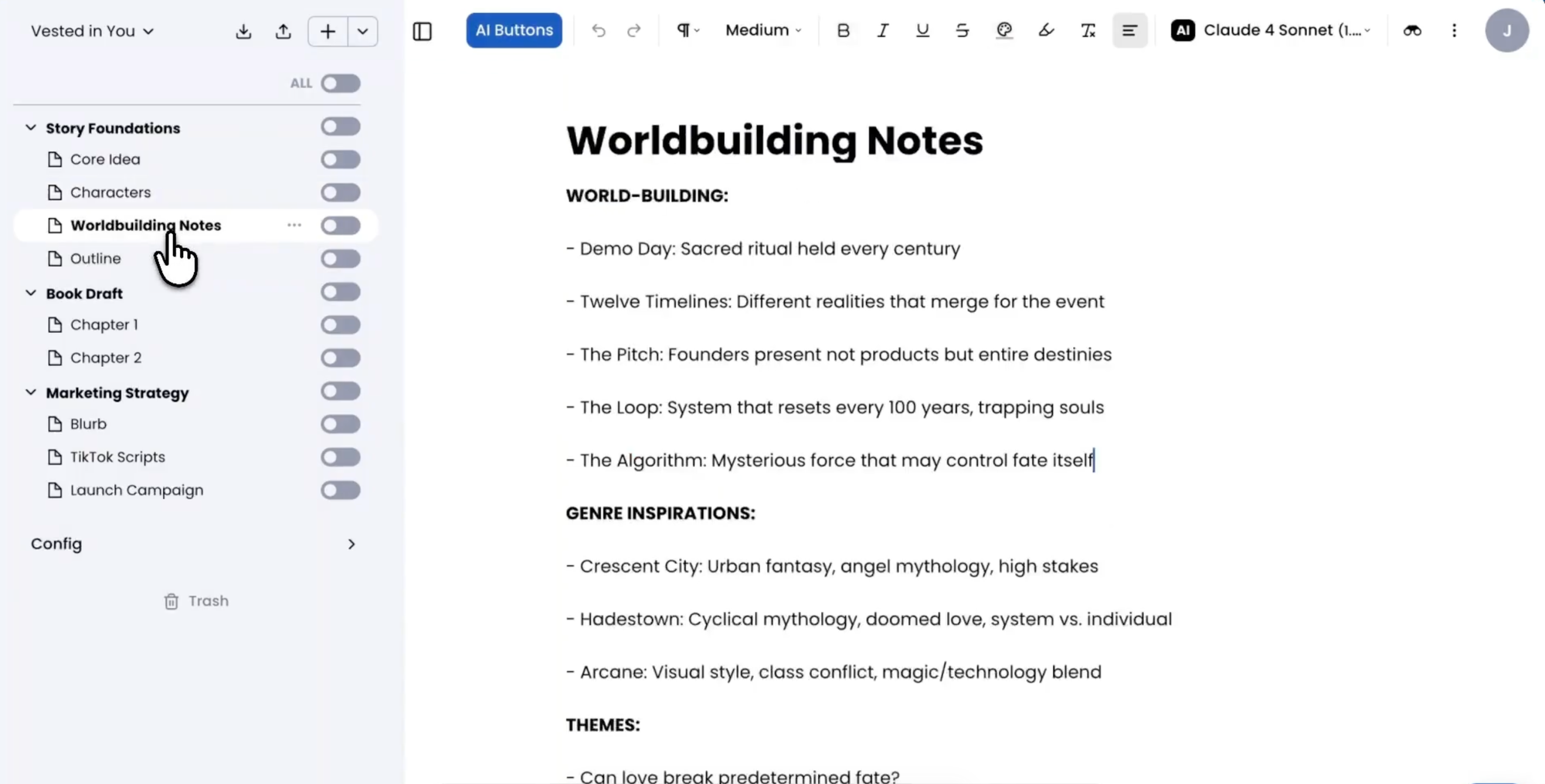
Similar to Scrivener’s workspace, Plotdrive’s platform has a persistent sidebar that organizes projects, notes, character profiles, and other supporting materials, allowing writers to move through different parts of a manuscript without switching tools. As projects grow more complex, the sidebar becomes a navigation system, keeping story elements accessible as the draft evolves.
AI functionality is integrated into this environment rather than layered on top of it. Writers interact with the program through actions tied to the text—often as pre-built tools designed for specific tasks like expanding a passage, adjusting tone, or continuing a scene. Suggestions appear in place, where they can be accepted, revised, or ignored. The system also distinguishes between AI-generated and human-written text, making it easier to review changes and maintain control over the draft. The emphasis is on reducing the need to stop and formulate prompts, allowing the writer to stay focused on the draft.
“We think writers were meant to create stories, not fight computer programs or do it alone.”
—Jay Rosenkrantz, Plotdrive founder
Beside this sits Co-writer, a more flexible AI tool that Rosenkrantz describes as a mix of developmental editor, writing coach, and assistant. It can be prompted directly when a writer wants input, or in a more active “auto mode,” where it surfaces suggestions during the writing process.
Rosenkrantz contrasts this with more common AI workflows: “ChatGPT feels like a hundred fragmented conversations. Every session starts from scratch,” he says. Plotdrive is designed to avoid that fragmentation, functioning instead as “a co-writer who’s read every word you’ve written and doesn’t forget.” It doesn’t have to be every word, however; users can also be selective about which words the tool can access and, in the navigational sidebar, toggle a switch to determine whether a document is visible to AI tools.
Tools like Google NotebookLM operate from a similar premise of working directly with provided documents, but they tend to function more as an external layer for reference, analysis, or synthesis. Plotdrive, in contrast, is designed to be an environment where drafting and revision happen continuously inside the same workspace.
How Writers Use Plotdrive
Plotdrive is designed to fit into existing workflows rather than replace them, and in practice, writers tend to engage with it in a few distinct ways.
For some, the entry point isn’t drafting at all. They begin instead by working through ideas with Co-writer, developing character profiles and plot outlines. At this stage, the chatbot-style AI tool built into Plotdrive functions less as a text generator and more as a space for maintaining momentum at the conceptual level—helping writers clarify structure, direction, or narrative problems before committing anything to draft.
From there, most long-term use shifts into the manuscript itself. This is where drafting, revision, and comparison happen in context. Writers move between sections of their work while keeping edits anchored directly to the text, using in-line feedback and revision tools as they refine scenes and structure.
How each part of the system is used varies significantly by writer. Newer authors tend to rely on Plotdrive’s AI tools more heavily for structure and guidance throughout drafting, but more experienced writers use them selectively—for example, to troubleshoot a scene, test alternatives, or speed up specific revision passes. Planners often spend more time upfront building outlines, character profiles, and style guides, and discovery writers are more likely to engage these tools as needed during the drafting process.
“[Plotdrive is] a co-writer who’s read every word you’ve written and doesn’t forget.”
—Jay Rosenkrantz, Plotdrive founder
Within its workspace, Plotdrive also includes a library of tools designed to support different stages of the writing process. These tools are grouped by function. Early-stage features support brainstorming and idea development, helping writers explore character concepts, world-building directions, or possible narrative paths before drafting begins. Mid-stage tools focus on revision, such as restructuring scenes, adjusting tone, or refining passages at the paragraph level. Additional tools extend beyond the manuscript, supporting planning work related to a book’s positioning or post-draft preparation.
Each tool works directly inside the manuscript and completes a single, defined action based on an AI prompt and selected text or project context documents. This allows writers to move between drafting and editing without leaving the document or re-entering instructions each time.
Writers can also create custom tools tailored to their own process. These allow repeated workflows—such as recurring edits or stylistic checks—to be saved and reused consistently across a project.
In one example from the walk-through, Rosenkrantz described a writer who built a custom tool not for drafting or revision but for motivation: generating inspirational quotes in the style of preferred authors. Although not part of the core writing process, it became a way to reengage with the work during moments of stalled momentum.
Overall, the system is designed to be flexible enough to reflect how individual writers work rather than requiring them to adapt to a fixed set of predefined steps.
Voice, Context, and Workflow Continuity
A core part of Plotdrive’s design is how it handles an author’s voice—not as a preset setting, even though there are several options during onboarding, but as something that emerges over time through context and use.
At the center of that system is the writing style guide feature, which is a collection of working documents that define a project’s tone, structure, narrative behavior, and stylistic preferences. Writers can build these documents manually, generate them through prompts, or construct them from existing writing samples.
In practice, these guides often become substantial reference documents. Rather than a few notes or a checklist, they can run several thousand words, combining examples of the writer’s own prose, genre expectations, and counterexamples that define what the writing should not do. That distinction matters for writers concerned about AI flattening their style. Plotdrive’s approach is highly dependent on input quality: The more specific and grounded the material, the more accurately the system can reflect a writer’s voice instead of defaulting to generic prose patterns.
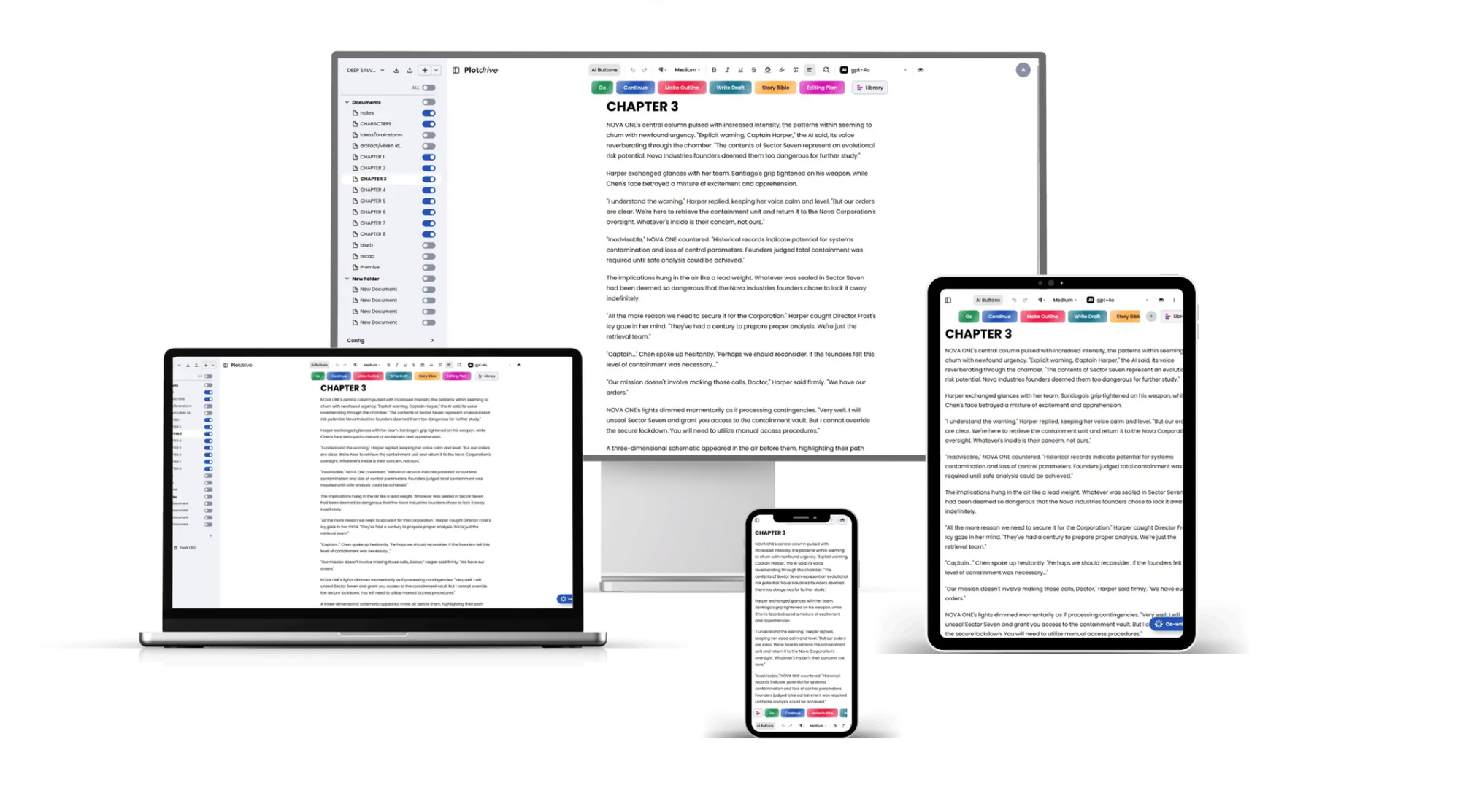
Behind the scenes, the platform integrates multiple AI models, including Claude, ChatGPT, and Gemini, and authors can switch between them manually. Writers don’t interact with these directly, but they shape how responses are generated.
Rosenkrantz frames this through what he calls a “creative control pyramid.” At the base is model selection: “Which AI model do you like to use? They can all come into Plotdrive, and you can choose,” he says. Above that is instruction clarity: “How clear are you in what you want the AI to accomplish for you at any phase of your workflow?” And at the top is context—the accumulated understanding the system has of the story, characters, and intent.
Plotdrive’s design focuses heavily on protecting that top layer while also giving users control over the other two. By keeping drafts, notes, and style guides inside a unified workspace, the system maintains context automatically. Writers don’t have to repeatedly reintroduce information or restart conversations. Instead, the AI responds with awareness of the broader project, drawing from materials already embedded in the workspace.
This idea of continuity extends into how the platform handles movement and flexibility. Because everything lives in the cloud and syncs across devices, writers can shift between desktop, laptop, tablet, or phone without losing their place in the work. Drafts can be imported from Word documents, Google Docs, or Markdown files, then exported back into those formats when needed. For writers working in short bursts or fragmented sessions, that continuity reduces the need to reconstruct context every time they return to a project.
Pricing
Plotdrive operates on a subscription model where AI usage is tied to monthly credit allocation.
The Pro plan is $29 per month when billed annually, or $39 on a month-to-month basis. It includes 20,000 AI credits per month, access to multiple AI models, unlimited projects, and collaboration for one additional user.
The Team plan is $149 per month annually, or $199 monthly, with 80,000 AI credits, up to three users, and shared workspaces designed for collaborative writing environments.
A Publisher tier is also available with custom pricing, including onboarding support, workflow design, and reporting tools for larger organizations.
Those interested in the platform can learn more or sign up for a free trial at https://plotdrive.com.
Limitations and Practical Considerations
Plotdrive is most effective when writers bring intentionality to the process. It is not designed to replace foundational thinking but to extend it once that foundation exists and a project already has direction, structure, or voice to work from.
Without strong inputs—such as structured notes, a working style guide, or a developed draft—output can drift toward generic phrasing or surface-level suggestions. The system performs best when it has a specific element it can use as an anchor, whether that is narrative direction, clearly defined character voice, or examples of the writer’s own prose that establish tone and rhythm.
Rosenkrantz is explicit that the system does not create voice on its own; it reflects what it is given. In other words, the more clearly a writer defines their style and provides grounded examples, the more accurately the tool can echo that voice rather than defaulting to generic patterns.
Rosenkrantz is also careful not to frame AI as a replacement for editorial expertise. Although Plotdrive can speed up drafting, help refine scenes, and offer developmental feedback during the writing process, he acknowledges that human editors still play a crucial role: understanding how a manuscript will actually land with readers and how tone, pacing, and structure translate into market expectations and emotional impact. AI can assist with shaping the text, but it does not replace that interpretive judgment or the experience of working with real audiences and publishing contexts.
For writers who prefer fully manual workflows or who are uncomfortable incorporating AI into their creative process, the platform is unlikely to feel necessary. It is not designed for automation without engagement, and it does not attempt to remove the writer from decision-making. Instead, it assumes active participation throughout—writers remain responsible for shaping, accepting, or rejecting what the system produces at every stage.

Plotdrive is not trying to redefine what writing is. Instead, it focuses on solving a more specific, practical problem: what happens when writing stops.
For some writers, that solution manifests as smoother drafting and fewer breaks in flow. For others, the benefit of the app is less about speed and more about recovery—having a place where both technical and creative blocks can be addressed without stepping away from the manuscript or rebuilding context from scratch.
Updates to credit usage focus on streamlining drafting, revision, and restructuring. Planned features also extend beyond the manuscript into marketing and post-publication tasks, such as drafting marketing and social media copy. Together, these changes suggest a gradual broadening of the platform’s scope beyond drafting alone and into more of the work involved in finishing a book.
What Plotdrive ultimately offers users is not a new definition of writing but instead a different environment for continuing it—built on the assumption that momentum is fragile and worth protecting.


